The simplest Mac remote.
Your Mac.
In your hand.
Sleep it. Mute it. Skip it. From across the room.

iPhone app + Mac agent · iOS 16+ · macOS 13+ · Free
Rimote
Talk about control.
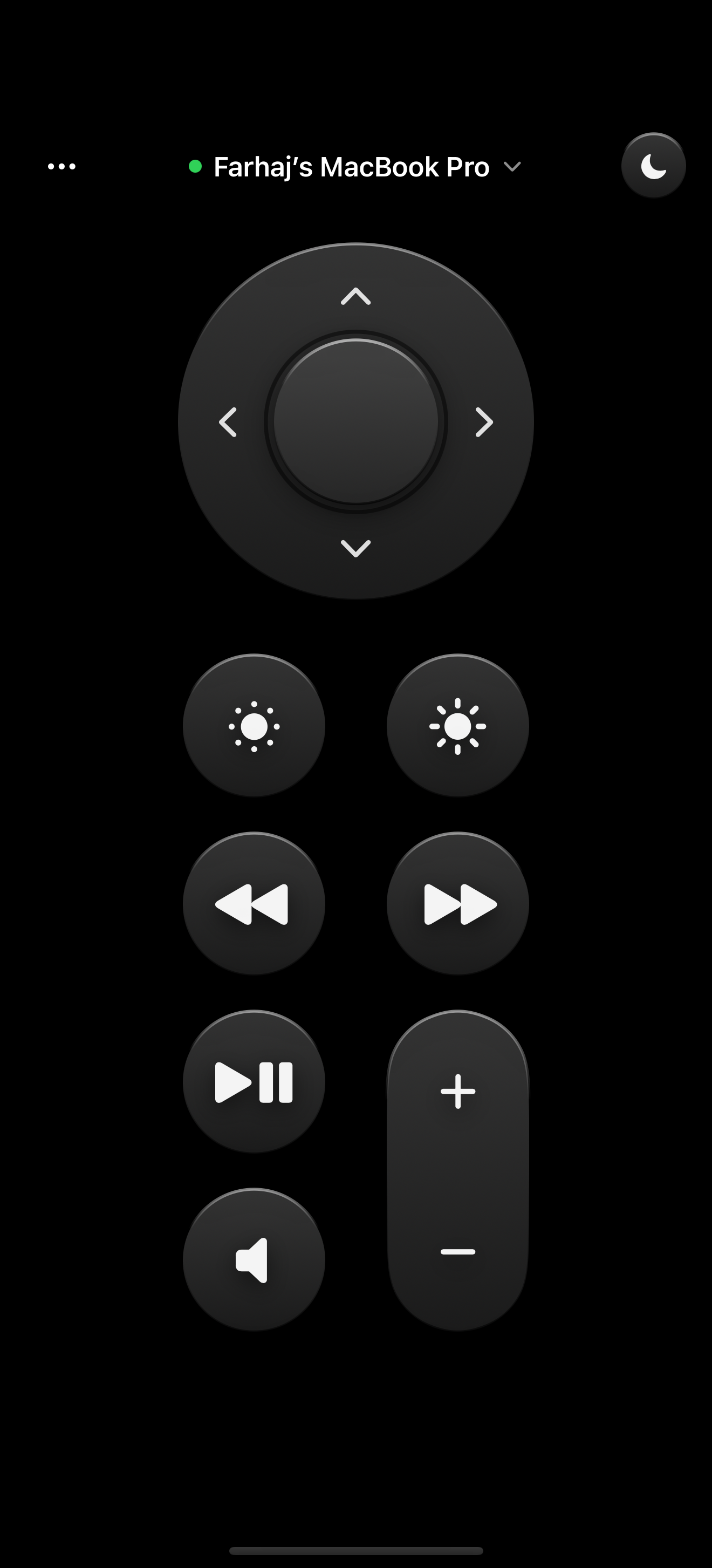
Lights out.
One tap puts your Mac to sleep. No terminal, no AppleScript.
Point. Click. Present.
A real clickpad with arrows and Select. Drive Presentations from the back of the room, skip the intro of your favourite show, or accept your AI agent's plan.
Brightness, from the couch.
Up or down, like a TV remote. No trip to System Settings.
Skip back. Skip ahead.
Scrub whatever's playing without touching the keyboard.
Pause. Play. Done.
One button that works everywhere from Netflix to YouTube, and Spotify.
Volume, handled.
Raise it, lower it, kill it. Instantly.
Local by design
Nothing leaves the room.
Most remotes route through someone else's server. Rimote doesn't have one. Your iPhone finds your Mac over Bonjour and sends commands straight to it across your Wi-Fi. No account, no cloud, no analytics.
Discovery
Found in under a second.
Your Mac announces itself over Bonjour. Open the iPhone app and it's already there.
_rimote._tcp
Bonjour discovery · your Wi-Fi only
The entire command set
Every action the agent can take, hardcoded. No shell, no scripts, no exceptions.
hardcoded · no shell · no eval ▌
Pairing
256-bit
✓ verified on every message
Pair once with a PIN. Every command is signed with a 256-bit token that never leaves your devices.
Agent CPU · idle
0.0%
The agent sleeps until you press a button. No polling, no timers.
How it works
Three steps. Thirty seconds.
agent running · starts at login
01 · step
Install the Mac agent
Download the .dmg and open it once. Rimote lives in your menu bar and starts with your Mac.
PIN from the menu bar
02 · step
Pair your iPhone
Get the iPhone app from the App Store. Your Mac is already on the list. Type the PIN once, never again.
✓ sleep · 9ms
03 · step
Control everything
Sleep it, mute it, skip the track from anywhere at home. Reconnection is automatic.
LAN only · nothing leaves your home network · no account required
FAQ
Questions, answered.
Does it work away from home, over cellular?
No, and that's the point. Rimote is LAN-only: your iPhone talks directly to your Mac over your own Wi-Fi, so commands never touch the internet.
Do I need an account?
No accounts, no sign-in, no email. Install both halves, type a 4-digit PIN once, and you're paired for good.
Do I need to keep the app open on my iPhone?
No. Open it, tap, put it away, like any remote. The tiny agent in your Mac's menu bar is the half that stays ready, at roughly 0% CPU.
Is it safe to let my phone control my Mac?
Rimote can only perform a fixed list of actions: volume, media, brightness, sleep, lock, and friends. Nothing from the network ever reaches a shell, and every command is checked against a 256-bit key only your paired devices know.
Is any data sent to your servers?
There are no servers. Nothing leaves your Wi-Fi, ever.
What do I need to run it?
An iPhone on iOS 16+ and a Mac on macOS 13+, on the same Wi-Fi. The Mac agent is a free, notarized 440 KB download.
Put your Mac
in your pocket.
The iPhone app is on the App Store. The Mac agent is free and open source.